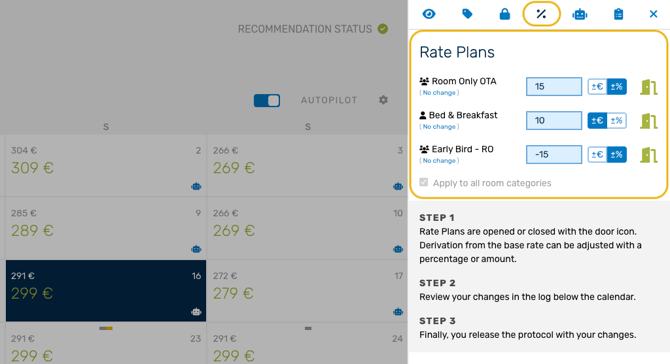
Note: Whether you can use rate plans, and which ones, depends on your PMS/CM.
Info: General rate plan management and configuration should be done on the Rate Plan Settings Page.
The Rate Plan tab provides a quick overview of your setup and allows for fast, manual adjustments.
Step by step - adjusting rate plans
If rate plans have been set for a particular day, it will be displayed in the calendar at the respective tab.
-
Go to the Manage page and select a date. The rate panel will open on the right side of the screen. Click on the % icon to view the Rate Plans tab.
-
You can make the following adjustments to the rate plans:
- Turn rate plans on or off for selected dates: use the green Close/Open icon
-
Adjust the rate plan value
Note: If the rate plan is set to person, you will see a 👤 (one person) icon. If the rate plan is set to unit, you will see a 👥 (group) icon.
-
A “Save” button will be displayed at the bottom of the restrictions panel, click “Save” to move the adjustment to the change log.
-
Finally, review the entries in the change log and publish them to your PMS.
Note: By default, rate plans apply to all room categories. To set different values for each category, deselect “Apply to all room categories” at the bottom of the editor.