
Rate recommendations are generated by combining RateBoard’s algorithm with your configured rate rules, rounding settings, and minimum and maximum price limits—resulting in optimized rates that stay fully aligned with your pricing strategy.
The following topics are covered in this article:
Where do I find the calculation tab?
How is the calculation working?
Practical examples
Where do I find the calculation tab?
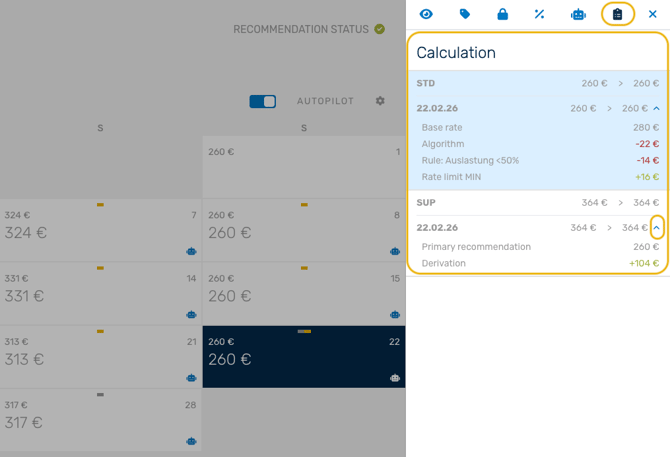
Go to the 'Manage' page and select a date. The rate editor will open on the right-hand side of the screen. Click on the icon at the top right to display the 'Calculation' tab.
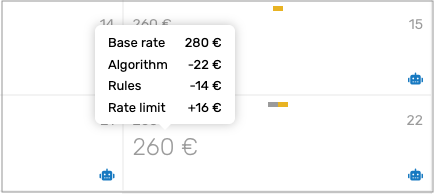
Tip - Rate Calculation Tooltip:
In the rate calendar, simply hover over any rate recommendation to see an infotip summary of how it is calculated. This tooltip highlights the main elements affecting the rate - and all applied rules are summarized under “Rules” in the sidebar.
How is the calculation working?
The rate recommendations are calculated through five main steps for your primary room type and are then applied to derived room types.
- Base rate – This is the starting point, defined by you in the price level.
- Algorithm – RateBoard’s algorithm analyzes your data, market trends and other variables to suggest an optimal rate.
- Recommendation rules – Custom rate rules, set up by you based on your hotel’s strategy.
- Rounding – The final recommendation is rounded based on the selected rounding rule (for example, rounding to the nearest 5 or 9).
- Min/Max limits – The system checks if the recommended rate is within your min/max rate limit set up in the price level. The recommendation will be adapted to stay within this range.
Tip: A description of the calculation logic is available on a related page. There you can find out which settings and factors have impact on the recommended rates:
Practical examples
Example 1: How rates are calculated for primary room types
You have a SUITE category, with the following price level set up for the primary room type JS.
Min: 220 €; Base: 260 €; Max: 350 €

For this room category, during a certain period of time you find the following situation:
- The algorithm identifies a high demand and increases your rate by 5%.
- A rate rule is set up for good weather that increases your rate by 2€.
- Rate rounding is set up to the nearest 9.
In this case your primary room rate JS is determined by the following calculation
- 260€
- Plus 5% > 273€
- Plus 2€ > 275€
- Rounded to the nearest 9 -> 279€
- Because the rate recommendation is within the max limit, 350€, nothing will be adjusted for min/max value and the final recommendation is 279€.
Example 2: How rates are calculated for derived room types
For derived room types, the recommendation starts from the primary room type’s final rate and is adapted according to your price level setup.
- Primary recommendation – The final rate calculated for the primary room type.
- Derivation – The adjustment you defined (a percentage or fixed value) to set how much higher or lower this room type should be compared to the primary one.
- Min/Max limits – The system again checks that the derived rate stays within your defined price level boundaries.
You have a derived SUITE room, NJS, with the following price level set up:

If the final rate recommendation for the primary room is 279€ for example, the derived room rate is determined by the following calculation:
- 279€
- Plus 40€ > 319€
- Because the rate recommendation is within the max limit, 390€, nothing will be adjusted for min/max value and the final recommendation is 319€.