
All the rate, restrictions and rate plans adjustments are displayed in the change log by room type.
Review changes and send
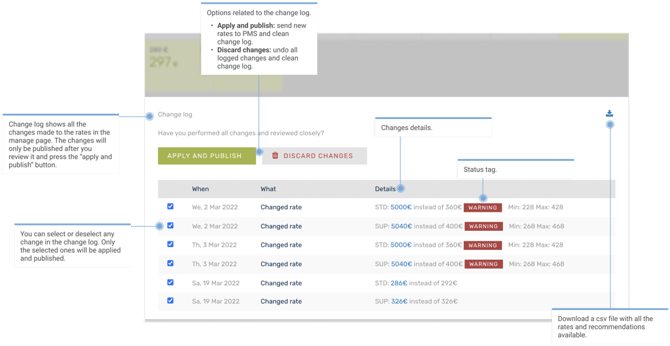
- Once you are done with the adjustment in rate calendar and saved them, all the changes will be displayed in the change log, for primary and derived rooms.
- Review the changes, make sure everything is as expected. If you are not happy with a specific adjustment, you could deselect the check box, only checked changes will be sent.
- Finally, click on “Apply and publish”. This will apply the changes to RateBoard and send the same to your PMS, CM or both (depending on your interface setup).
- Once you send a rate update, you will receive directly a success message on your screen. With certain interfaces however, RateBoard does not push the data, but it will be collected and "pulled" by your system. The frequency depends on your settings in the PMS/CM.
- While the rate update is pending in RateBoard, you will see a gray spinner next to the rate.

- A red spinner will appear if there was an error while sending the rate. Please do not hesitate to reach out to RateBoard Support in this case.

- While the rate update is pending in RateBoard, you will see a gray spinner next to the rate.